7 Pinterest Marketing Mistakes That Are Killing Your E-commerce Sales (And How to Fix Them)
Discover the critical Pinterest marketing mistakes that are costing you sales. Learn proven strategies to fix them and turn Pinterest into your #1 traffic driver in 2026.
Pinterest isn't just a place to find recipe ideas and home decor inspiration anymore. With over 498 million monthly active users and 89% of Pinners using the platform to make purchase decisions, Pinterest has become a goldmine for e-commerce businesses.
Yet, many online sellers are making critical mistakes that sabotage their success before they even get started.
If you've been pinning consistently but seeing disappointing results—low engagement, minimal website traffic, or worse, zero sales—chances are you're falling into one of these common traps.
The good news? Every single one of these mistakes is fixable, and some of the solutions take just minutes to implement.
In this guide, we'll break down the 7 most common Pinterest marketing mistakes that are costing you sales, and show you exactly how to fix them. Whether you're just getting started with Pinterest or looking to turn around a struggling account, these strategies will help you transform Pinterest into your #1 traffic driver.
Why Pinterest Marketing Matters for E-commerce in 2026
Before we dive into the mistakes, let's talk about why getting Pinterest right is so crucial:
The Numbers Don't Lie:
- 85% of weekly Pinners have made a purchase based on Pins they saw from brands
- Pinterest drives 3.8x more sales than other social platforms
- The average order value from Pinterest traffic is $50+ (higher than most social platforms)
- Pinterest users are actively shopping—not just browsing
- Pins have a much longer lifespan than posts on other platforms (months vs. hours)
Unlike Instagram or TikTok where content disappears from feeds within hours, a single Pinterest pin can drive traffic to your store for months or even years. That's the power of Pinterest's search-based discovery system.
But only if you're doing it right.
Mistake #1: Inconsistent Posting Schedule
The Problem:
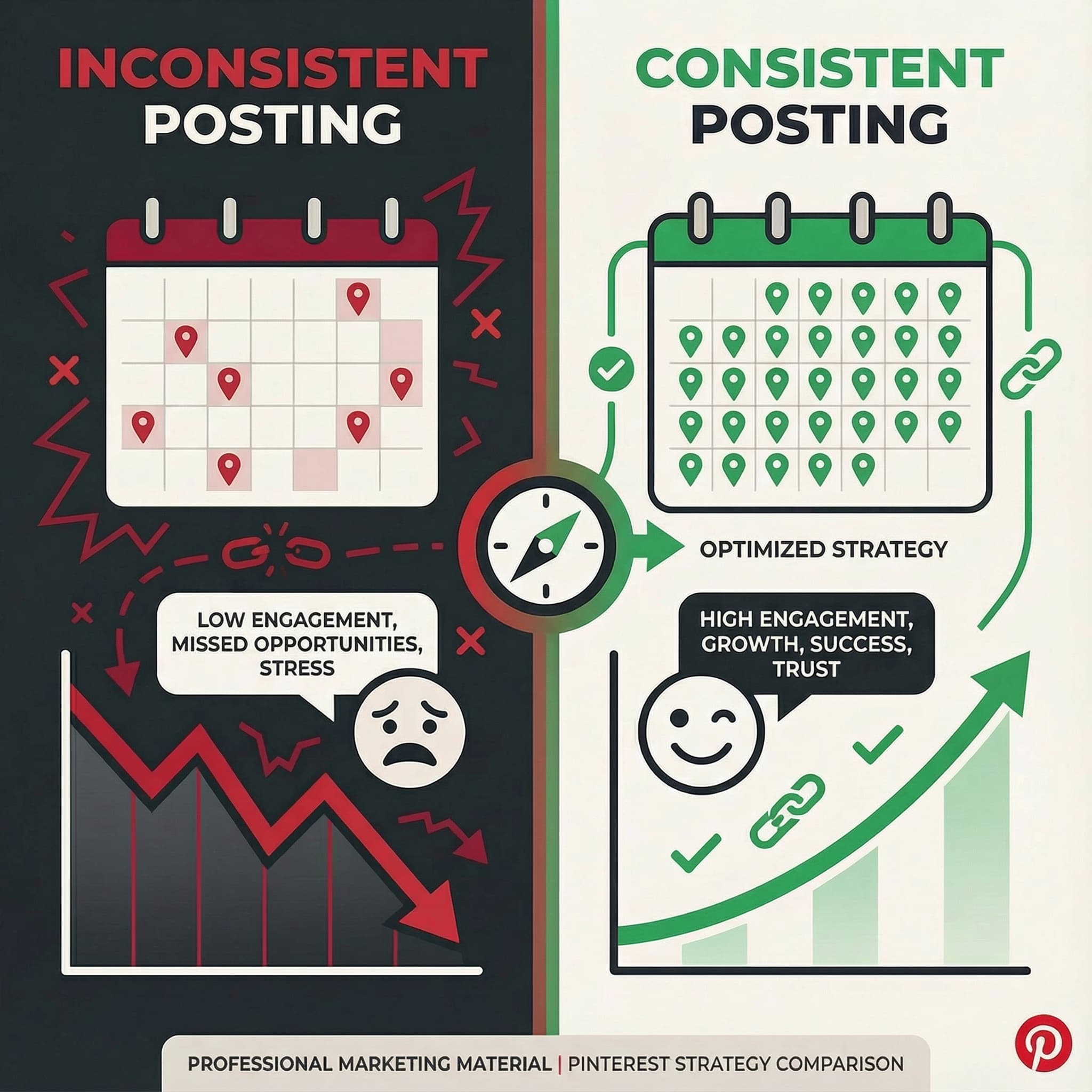
You post 20 pins one day, then nothing for two weeks. Or you pin manually whenever you "remember" to check Pinterest. This feast-or-famine approach is one of the fastest ways to kill your Pinterest growth.
Pinterest's algorithm rewards consistency. When you post sporadically, the algorithm sees your account as less active and reduces your visibility in search results and home feeds. Your followers (and potential customers) also lose trust when your boards look abandoned.
Real-world impact: Accounts that post inconsistently see 67% less engagement than those maintaining a regular schedule. That's not a small difference—that's the difference between Pinterest being a major traffic driver and a complete waste of time.
The Solution:
Implement a Consistent Posting Strategy:
- Post daily (or at minimum, 5-6 times per week): Aim for 5-15 fresh pins per day
- Schedule in advance: Use scheduling tools to plan 2-4 weeks ahead
- Establish peak posting times: Research shows 8-11 PM performs well for most niches, but test your specific audience
- Create batches: Dedicate one day to creating 30-50 pins, then schedule them out
The Reality Check: "But I don't have time to pin every single day!"
This is where automation becomes essential. Manual pinning isn't sustainable for busy entrepreneurs. Tools that let you create and schedule pins in bulk mean you can spend 2 hours on a Sunday planning your entire month of Pinterest content.
Pro Tip: The key isn't just posting consistently—it's posting fresh content consistently. Re-pinning old content doesn't carry the same weight as publishing new, original pins with fresh descriptions and imagery.
Mistake #2: Using Generic Product Photos
The Problem:
You're taking the product photos straight from your website or supplier and pinning them without any optimization. While your product might be amazing, generic product shots on white backgrounds simply don't perform on Pinterest.
Pinterest is a visual search engine. Users are scrolling through hundreds of pins per session, and they stop for images that:
- Tell a story
- Show the product in use
- Evoke emotion
- Stand out visually
- Match Pinterest's aesthetic
Your boring product shot on a white background? It blends in with 50 other similar images and gets scrolled past in milliseconds.
Real-world impact: A/B tests consistently show that lifestyle images and styled product photos get 3-5x more engagement than generic product shots. That's not a minor improvement—that's transformational.
The Solution:
Create Multiple Pin Variations:
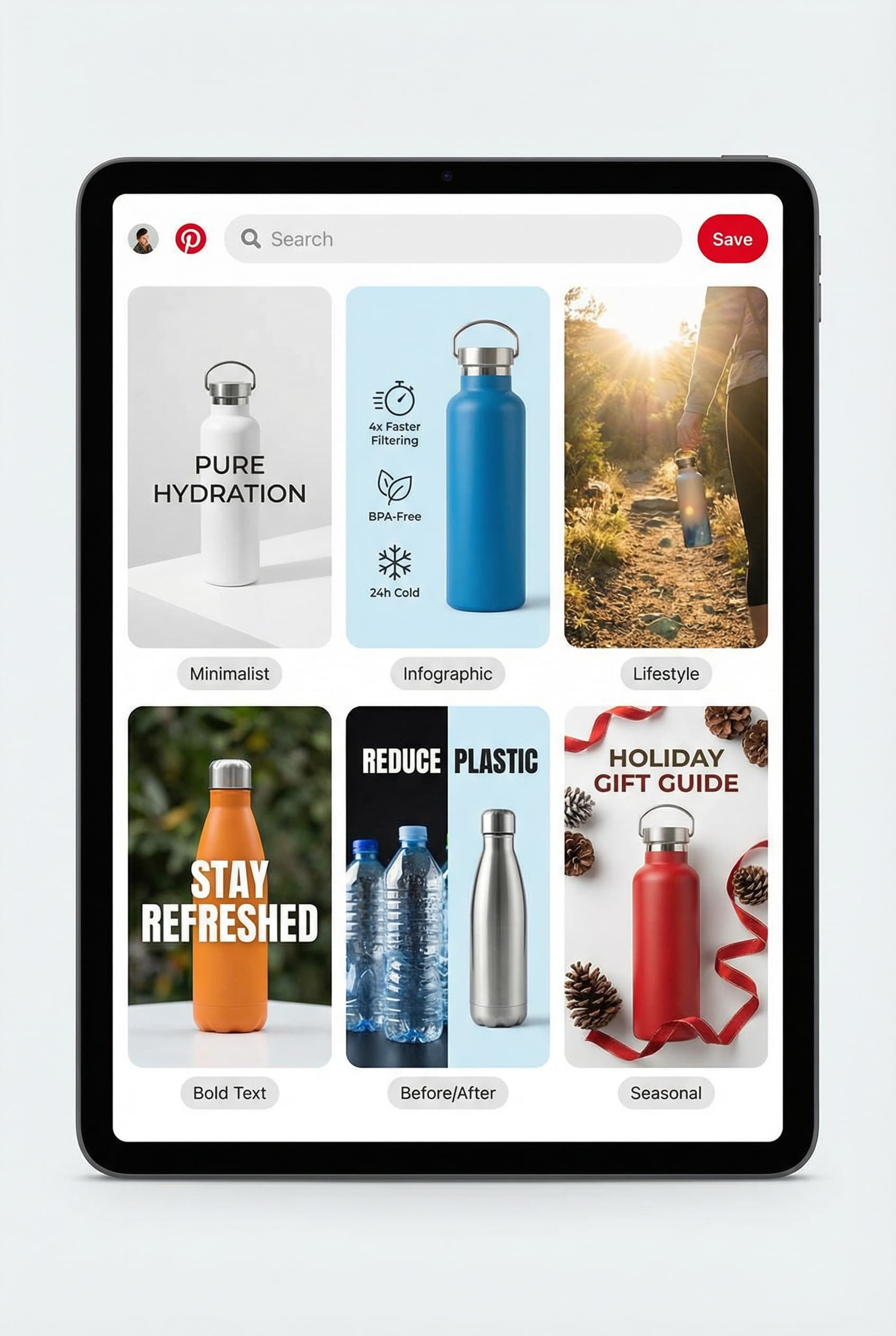
- Lifestyle context: Show your product being used in real-life situations
- Before/after comparisons: Particularly powerful for problem-solving products
- Infographic-style pins: Combine product images with benefits, features, or how-to instructions
- Vertical formats: Pinterest's ideal ratio is 2:3 (1000 x 1500 pixels)
- Text overlays: Add compelling headlines that preview your content's value
The Template Formula:
- Top 1/3: Eye-catching headline in large, readable font
- Middle 1/3: High-quality product image or lifestyle shot
- Bottom 1/3: Brand logo + call-to-action
Color Psychology Matters: Pinterest analytics show certain color combinations consistently outperform others:
- Red and orange: 2x more saves (urgency, excitement)
- Multiple colors: 3x more repins than single-color images
- Lighter backgrounds: Better than dark for most niches
- High contrast text: Essential for readability
AI-Powered Solution: Modern tools can now generate multiple pin variations from a single product URL, automatically creating different layouts, color schemes, and text overlays. This takes the design work off your plate while ensuring every product has 5-10 different pin variations to test.
Pro Tip: Never use the same image across multiple pins. Pinterest's algorithm may see this as duplicate content and limit your reach. Always create unique variations—change the background, adjust the layout, modify the text overlay, or alter the product angle.
Mistake #3: Not Optimizing Board Names for SEO
The Problem:
Your boards are named things like "My Favorites," "Love This," or "Cool Stuff." While these might make sense to you, they're completely useless for Pinterest SEO.
Pinterest is a visual search engine. When someone searches for "boho wedding decor ideas," Pinterest looks at board names, pin titles, and descriptions to determine what to show. Vague board names mean your carefully curated content never gets discovered.
Real-world impact: Boards with SEO-optimized names receive 5-10x more impressions than boards with generic names. You could have amazing content, but if your board is called "Pretty Things," no one searching for "minimalist home office ideas" will ever find it.
The Solution:
Implement Strategic Board Naming:
Instead of vague names, use descriptive, keyword-rich board names that clearly communicate what users will find:
❌ Poor Board Names:
- "Vibes"
- "Things I Like"
- "My Style"
- "Cool Finds"
- "Inspo"
✅ Optimized Board Names:
- "Minimalist Home Office Ideas"
- "Small Business Marketing Tips"
- "Boho Wedding Decor & Ideas"
- "Easy Weeknight Dinner Recipes"
- "Sustainable Fashion & Ethical Brands"
The Formula: [Keyword/Category] + [Specific Niche] + [Optional: Year or Benefit]
Examples:
- "Scandinavian Interior Design Ideas"
- "Pinterest Marketing for Small Business"
- "Quick Healthy Lunch Recipes Under 30 Minutes"
- "Handmade Jewelry Ideas & Tutorials"
Need Inspiration?
Choosing the right board names is crucial for discoverability. Check out our comprehensive guide to 500+ Creative Pinterest Board Names organized by category to find the perfect names for your e-commerce boards—whether you sell fashion, home decor, handmade products, or digital goods.
Don't Forget Board Descriptions:
Board names are just the beginning. Your board description (150-500 characters) is prime real estate for SEO:
Board Name: "Sustainable Fashion & Ethical Brands"

Description: "Discover eco-friendly fashion brands, sustainable
clothing ideas, and ethical shopping tips. From organic cotton
basics to fair trade accessories, find stylish ways to shop
sustainably. Perfect for conscious consumers seeking slow fashion
alternatives to fast fashion. #sustainablefashion #ethicalfashion
#slowfashion"
Pro Tip: Create boards for each major product category, target audience, or use case. The more specific your boards, the easier it is for the right audience to find your content. Having 10-15 well-organized, keyword-optimized boards is far better than 3 catch-all boards.
Mistake #4: Posting at Random Times
The Problem:
You pin whenever it's convenient for you—maybe during your lunch break at 1 PM on a Tuesday, or late at night when you finally have a spare moment. But here's the thing: when you have time to pin often has nothing to do with when your audience is most active on Pinterest.
Pinterest's algorithm gives fresh pins a visibility boost when they're first published. If you post when your audience is asleep or offline, that initial boost is wasted. By the time they log on, your pin has already dropped in the feed.
Real-world impact: Pins posted during peak engagement windows receive up to 400% more initial engagement than those posted during off-hours. That early engagement signals to Pinterest that your content is valuable, which leads to more long-term visibility in search results.
The Solution:
Identify and Schedule for Peak Times:
General Best Times to Pin (based on 2025-2026 data):
- Evening hours: 8 PM - 11 PM (highest engagement across most niches)
- Weekend mornings: 8 AM - 11 AM on Saturday and Sunday
- Weekday mornings: 2 AM - 4 AM (catches early risers and overnight scrollers)
Why Evening? People browse Pinterest while winding down for the day, planning projects, or shopping from their couch. This is prime "discovery mode" time.
But Wait—Your Audience Might Be Different:
These general guidelines are a starting point, but your specific niche and audience may have different patterns:
- Home decor & DIY: Peak on weekends (planning projects)
- Fashion & beauty: Strong during lunch hours (12-1 PM) and evenings
- Food & recipes: High engagement 4-7 PM (dinner planning time)
- Wedding planning: Weekend evenings and Sunday mornings
- Business & productivity: Weekday mornings (6-9 AM)
How to Find YOUR Best Times:
- Go to Pinterest Analytics
- Check "Audience Insights" → "When your audience is on Pinterest"
- Note the days and times with highest activity
- Schedule your pins for 30-60 minutes before these peak times
- Test and track results for 30 days
- Adjust based on performance data
The Scheduling Strategy:
Instead of posting all your daily pins at once, spread them out:
- Morning post: 8 AM
- Afternoon post: 2 PM
- Evening post: 8 PM
This gives each pin its own moment to shine and keeps your account active throughout the day.
Pro Tip: Schedule pins at least 2-4 weeks in advance. This removes the daily stress of "What should I post today?" and ensures you never miss a day due to illness, vacation, or just being busy. Batch-create content once or twice a month, then schedule it strategically for optimal times.
Mistake #5: Creating Only One Pin Per Product
The Problem:
You've spent hours (or days) creating the perfect product. You photograph it beautifully, write a compelling description, and create one pin. Then you move on to the next product.
This is a massive missed opportunity. Here's why:
- Different audiences prefer different visual styles: What appeals to minimalists might not attract maximalists
- Testing is impossible: You have no data on what resonates best
- Limited reach: Pinterest's algorithm may show your pin to a small test audience, and if that specific group doesn't engage, your pin dies
- Seasonal relevance: A summer-themed pin might flop in winter, but you'll never know if a different approach would work
Real-world impact: Brands that create 5-10 pin variations per product see 10-20x more impressions than those creating just one pin. Plus, different pins catch fire at different times—you never know which variation will go viral.
The Solution:
Embrace the Multiple Pin Strategy:
Create 5-10 Pin Variations for Each Product/Blog Post:
Variation 1: Product Showcase
- Clean product image on complementary background
- Bold headline highlighting main benefit
- Professional and straightforward
Variation 2: Lifestyle Context
- Product in use or styled in a scene
- Shows scale, functionality, and emotional appeal
- Text overlay with use case: "Perfect for Small Spaces"
Variation 3: Before & After
- Problem-solution format
- Left side: pain point, Right side: solution (your product)
- Highly engaging for transformation products
Variation 4: Infographic Style
- Product image + bullet points of features/benefits
- Educational and shareable
- Works great for products with multiple selling points
Variation 5: Quote/Text-Heavy
- Large text overlay with compelling statement
- Smaller product image
- Catches attention in text-loving audiences
Variation 6: Seasonal/Themed
- Product styled for current season or holiday
- "Holiday Gift Guide: Perfect for Mom"
- Time-sensitive appeal
Variation 7: Color Variations
- Same layout but different color schemes
- Test which colors resonate with your audience
- Purple/pink for feminine niches, blues/greens for wellness, etc.
Testing Protocol:
- Week 1-2: Publish all variations
- Week 3-4: Monitor performance (impressions, saves, clicks)
- Month 2: Double down on top performers
- Month 3+: Create similar variations to your winners
The Data Doesn't Lie:
Pinterest analytics will show you exactly which pins perform best:
- Click-through rate (CTR): Which pins drive traffic
- Save rate: Which pins users want to reference later
- Impression count: Which pins Pinterest is showing more often
- Outbound clicks: Which pins actually drive sales
Pro Tip: Don't create all variations at once and publish simultaneously. Space them out over 2-4 weeks. This gives each pin time to get initial distribution, and you can learn from early performers to inform later variations.
Mistake #6: Ignoring Pinterest Analytics
The Problem:
You're pinning consistently, creating beautiful images, and following all the best practices—but you never look at your analytics. You have no idea what's working and what's flopping. You're essentially driving with your eyes closed.
Many sellers treat Pinterest as a "post and pray" platform. They create content, hit publish, and hope for the best. But Pinterest provides incredibly detailed analytics that tell you exactly what your audience loves (and what they ignore).
Real-world impact: Businesses that regularly review and act on Pinterest analytics see 3-5x faster growth than those who don't. Why? Because they stop wasting time on content that doesn't work and double down on what does.
The Solution:
Implement a Data-Driven Pinterest Strategy:
Key Metrics to Track Weekly:
1. Impressions
- How often your pins are shown
- Indicates overall reach and content distribution
- Goal: Steady upward trend month-over-month
2. Engagements (Saves + Clicks)
- Total actions users take on your pins
- Higher engagement = Pinterest shows your content more
- Goal: 2-5% engagement rate (saves ÷ impressions)
3. Pin Clicks
- Users clicking through to your website
- The metric that actually drives traffic
- Goal: 0.5-2% click-through rate
4. Outbound Clicks
- Clicks specifically leaving Pinterest to your site
- Most important metric for e-commerce
- Track this against your Google Analytics to see revenue
5. Save Rate
- How many users save your pins to their boards
- High saves = valuable, reference-worthy content
- Pinterest heavily weights save rates in algorithm
6. Video Views (if using video pins)
- How many users watch your video pins
- Growing content format on Pinterest
- Higher engagement than static images
What to Do with This Data:
Monthly Analytics Review Process:
- Identify Top Performers: Sort pins by clicks or saves
- Find Patterns: What do your best pins have in common?
- Similar colors?
- Specific topics?
- Certain text styles?
- Particular product types?
- Analyze Bottom Performers: What flopped and why?
- Confusing messaging?
- Boring visuals?
- Wrong audience?
- Adjust Your Strategy: Create more content like your winners
- Test New Approaches: Don't get complacent—keep experimenting
Board Performance Analysis:
Don't just look at individual pins—review board performance:
- Which boards get the most followers?
- Which boards drive the most clicks?
- Which boards have the highest engagement rates?
This tells you what topics your audience cares about most. If your "Sustainable Fashion" board massively outperforms your "Accessories" board, you know where to focus content creation.
Audience Insights:
Pinterest tells you WHO is engaging with your content:
- Demographics (age, gender, location)
- Interests and affinities
- When they're most active
- What devices they use
Use this to refine your targeting and content strategy.
Pro Tip: Set up a simple spreadsheet to track your key metrics monthly. Just 5 numbers:
- Total impressions
- Total engagements
- Outbound clicks
- Top-performing pin (with CTR)
- Website traffic from Pinterest (from Google Analytics)
This historical data becomes incredibly valuable for identifying trends and measuring ROI.
Mistake #7: Spending Hours on Pinterest Instead of Growing Your Business
The Problem:
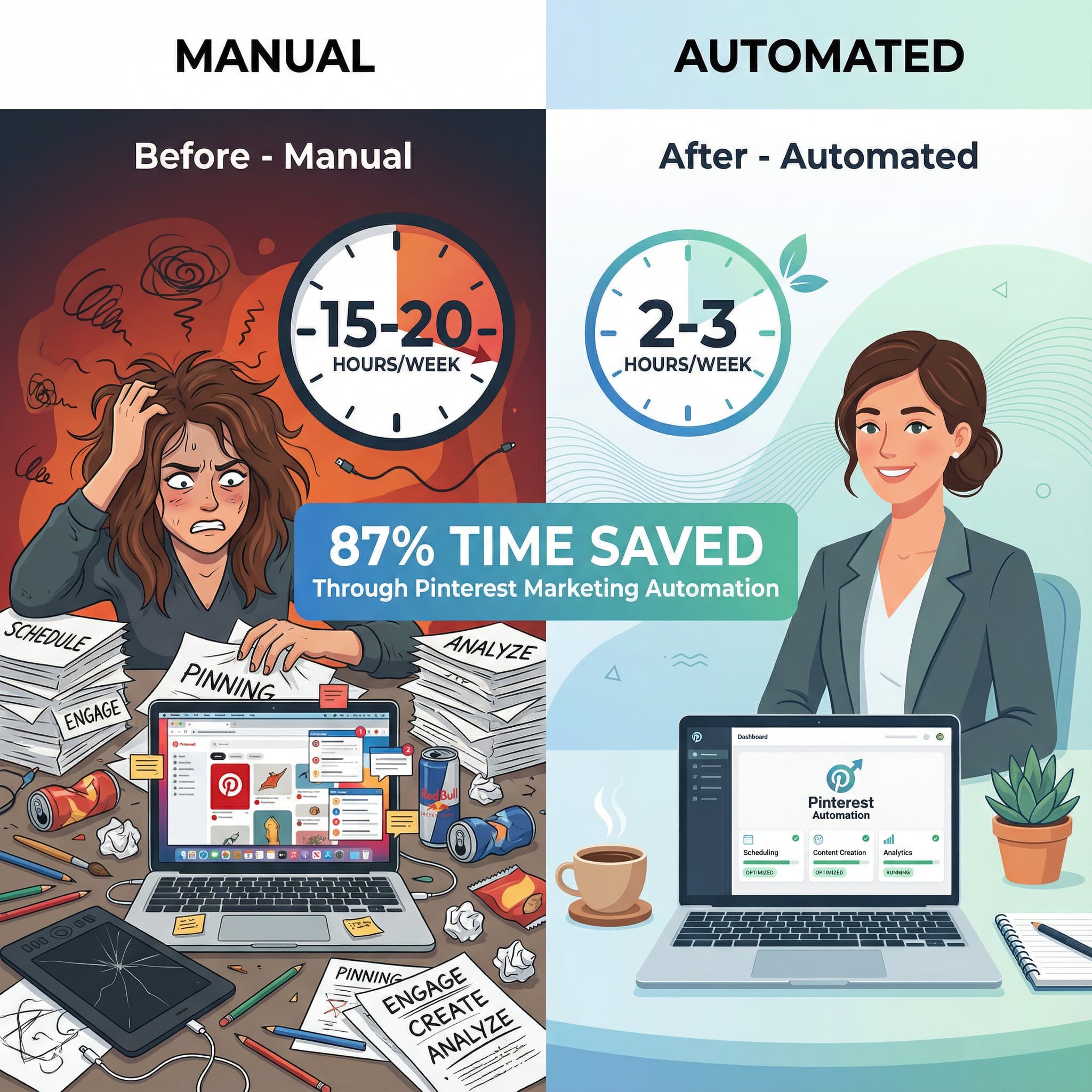
Pinterest can be a massive time sink. Between designing pins, writing descriptions, researching keywords, scheduling posts, engaging with the community, and analyzing performance—you could easily spend 15-20 hours per week on Pinterest alone.
But here's the brutal truth: As an e-commerce entrepreneur, your time is your most valuable asset. If you're spending 3 hours a day manually creating and pinning content, that's 3 hours you're NOT:
- Developing new products
- Improving customer service
- Optimizing your website
- Building email campaigns
- Running paid ads
- Creating strategic partnerships
Real-world impact: Entrepreneur time studies show that manual Pinterest management can consume 10-20 hours per week. For a solopreneur earning $50/hour in their business, that's $500-$1,000 worth of time spent on a single marketing channel. If Pinterest isn't your primary revenue driver, this math doesn't add up.
The Solution:
Embrace Strategic Automation:
The goal isn't to eliminate Pinterest from your strategy—it's to make it sustainable and efficient. Here's how:
1. Batch Content Creation
Instead of creating pins one at a time:
- Dedicate 2-4 hours twice per month to pin creation
- Create 30-50 pins in one sitting
- Use templates to speed up design process
- Write descriptions in batches using formulas
Time saved: 10+ hours per month
2. Use AI-Powered Tools
Modern Pinterest marketing tools can:
- Extract product details from your URLs automatically
- Generate multiple pin variations with one click
- Write SEO-optimized descriptions using AI
- Schedule posts weeks in advance
- Track performance and suggest optimizations
This is where tools like bengago come in. Instead of spending 20 minutes manually designing each pin, you can:
- Paste your product URL
- Select your preferred style template
- Generate 5-10 pin variations instantly
- Schedule them for optimal posting times
- Track performance automatically
What used to take 20 hours now takes 2 hours.
3. Create Systems and Templates
Develop repeatable systems:
- Pin design templates: 5-7 templates you reuse with different content
- Description formulas: Copy-paste structure you customize
- Keyword lists: Pre-researched keywords for your niche
- Posting schedule: Set-it-and-forget-it calendar
4. Outsource Strategically
If automation isn't enough, consider:
- Virtual assistant: $15-25/hour for scheduling and basic tasks
- Graphic designer: Create template sets you reuse
- Pinterest manager: $500-2000/month for full management
But honestly? With modern automation tools, most small businesses don't need to outsource Pinterest anymore.
The ROI Calculation:
Before you spend another 10 hours on Pinterest this week, ask:
- How much traffic does Pinterest drive? (Check Google Analytics)
- What's the conversion rate of Pinterest traffic?
- What's the average order value?
- What's the lifetime value of a Pinterest customer?
If Pinterest drives significant revenue, the time investment makes sense. If it doesn't, either:
- Fix your strategy (using the tips in this post)
- Automate it heavily
- Or redirect that time to higher-ROI channels
The Sustainable Pinterest Strategy:
Aim for 2-3 hours per week maximum:
- 30 minutes: Content batching and scheduling (covers 1-2 weeks)
- 30 minutes: Community engagement and responding to comments
- 30 minutes: Analytics review and strategy adjustment
- 60 minutes: Testing new ideas or creating seasonal content
That's it. Anything more and you're likely hitting diminishing returns.
Pro Tip: Track your time for one week. Log every minute you spend on Pinterest tasks. You'll be shocked at how much time disappears into "just checking Pinterest quickly" or "making one more pin variation." Time tracking creates awareness, and awareness drives better decisions.
Bonus Mistake: Not Including Clear Calls-to-Action
Quick Mention:
This deserves a brief call-out: Your pins MUST tell users what to do next.
- "Shop Now"
- "Read the Full Guide"
- "Get the Recipe"
- "Download the Template"
- "Save for Later"
Without a CTA, users might admire your pin but never click through. Make it obvious what action you want them to take.
Putting It All Together: Your Pinterest Success Action Plan
If you've recognized yourself making several (or all!) of these mistakes, don't panic. The fact that you now know what's wrong means you can fix it.
Your 30-Day Pinterest Recovery Plan:
Week 1: Foundation
- Audit and rename all boards with SEO-friendly names
- Write keyword-rich descriptions for each board
- Research your peak posting times using Pinterest Analytics
- Set up a content calendar for the next 30 days
Week 2: Content Creation
- Create 5-10 pin variations for your top 5 products
- Design templates you can reuse for future pins
- Write pin description formulas for different product types
- Set up a scheduling system (tool or VA)
Week 3: Implementation
- Schedule all created pins for optimal times
- Set up Pinterest Analytics tracking spreadsheet
- Create process documentation for future pin creation
- Test different pin styles and formats
Week 4: Optimization
- Review first 3 weeks of data
- Identify top-performing pins and boards
- Create more content similar to winners
- Eliminate or modify bottom performers
- Plan next month's content based on insights
After 30 Days:
You should see:
- ✅ Increased impressions and reach
- ✅ Higher engagement rates (saves and clicks)
- ✅ More consistent traffic to your website
- ✅ Better understanding of what content resonates
- ✅ Sustainable system that takes 2-3 hours per week
After 90 Days:
Expect:
- 📈 200-500% increase in Pinterest traffic
- 📈 Measurable impact on revenue from Pinterest referrals
- 📈 Growing audience of engaged followers
- 📈 Evergreen pins continuing to drive traffic months after posting
The Bottom Line: Pinterest Can Transform Your E-commerce Business
Pinterest isn't just another social media platform to add to your overwhelmed marketing to-do list. When done correctly, it's a powerful sales channel that can drive consistent, high-intent traffic to your online store for months and years to come.
The seven mistakes we've covered aren't just theoretical problems—they're the real, tangible reasons most e-commerce sellers fail on Pinterest:
- Inconsistent posting kills your algorithm visibility
- Generic photos get ignored in the feed
- Poor board names make your content undiscoverable
- Random posting times waste your engagement potential
- Single pin per product limits your reach and testing
- Ignoring analytics means flying blind
- Manual management steals time from your business
But here's the exciting part: Every single one is fixable. And many of the fixes take just minutes to implement.
You don't need to be a design expert, SEO guru, or social media manager to succeed on Pinterest. You just need to understand how the platform works, create valuable content, and implement smart systems that make Pinterest sustainable for your business.
The entrepreneurs seeing massive success on Pinterest in 2026 aren't spending 20 hours a week manually pinning. They're working smarter, not harder—using automation, data-driven decisions, and strategic batching to maximize results while minimizing time investment.
Ready to Fix Your Pinterest Strategy?
Now that you know the mistakes and solutions, you have two choices:
Option 1: Spend the next few weeks manually implementing these strategies—designing dozens of pin variations, researching keywords, scheduling posts, and tracking analytics.
Option 2: Use tools built specifically to solve these problems automatically.
bengago was created for e-commerce entrepreneurs who want Pinterest results without the Pinterest time-suck. Our AI-powered platform:
✅ Extracts product details from your URLs automatically
✅ Generates multiple pin variations in seconds (no design skills needed)
✅ Writes SEO-optimized descriptions with trending keywords
✅ Schedules pins for optimal posting times weeks in advance
✅ Tracks performance so you know what's working
What used to take 20 hours now takes 20 minutes.
Start using bengago today and see how much time you can reclaim while finally getting Pinterest to work for your business → Start creating better pins today
Frequently Asked Questions
Q: How long does it take to see results from Pinterest marketing?
A: Unlike paid ads with immediate results, Pinterest is a long-game strategy. Most businesses see initial traction within 30-45 days, significant traffic growth by 90 days, and strong ROI by 6 months. The key is consistency—pins you create today can still drive traffic years from now.
Q: Do I need a large following to succeed on Pinterest?
A: No! Pinterest is a search engine, not a social network. Follower count matters far less than creating searchable, engaging content. Many accounts with under 1,000 followers drive thousands of monthly website visits because their pins rank well in search results.
Q: How many pins should I post per day?
A: Aim for 5-15 fresh pins per day. More isn't always better—quality and consistency beat quantity. It's better to post 5 great pins daily than 50 mediocre ones twice a week.
Q: Should I use Pinterest ads or focus on organic?
A: Start with organic to understand what content performs, then amplify winners with ads. Paid ads work best when you already have proven content that converts. Don't use ads to compensate for poor organic strategy.
Q: Can I succeed on Pinterest with a small product catalog?
A: Absolutely! The multiple pin variation strategy means even one product can generate 30-50 different pins. Plus, you can create content around use cases, styling tips, gift guides, and educational content—not just direct product promotions.
Q: Is Pinterest worth it for B2B businesses?
A: While Pinterest is most powerful for B2C e-commerce (especially in fashion, home, food, and lifestyle), B2B businesses in visual industries (design, marketing, productivity tools) can also succeed. The key is creating valuable, educational content that solves problems.
Last Updated: January 4, 2026
Category: Pinterest Marketing
Reading Time: 15 minutes
Share this guide with fellow e-commerce entrepreneurs who are struggling with Pinterest. Let's help more small businesses discover the power of smart Pinterest marketing!
Ready to Create Stunning Pins?
Turn your Pinterest board names into reality with beautiful, AI-generated pins in seconds.
Start Creating Free